


Waifus Next Door
4.460.00 Reviews
App Specs
- Version
- 1.3.0717
- Updated On
- License
- Free
- Downloads
- 50,000+
- Developer
- Wildfire Interactive
- Categories
- Simulation
- Platform
- Android
Screenshots






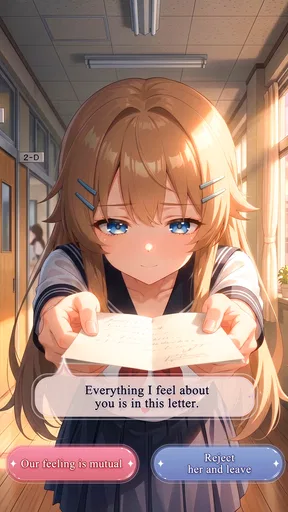

 Analysis by AppCompare
I went into Waifus Next Door expecting a light anime-themed simulation, and that is broadly what it feels like: a casual city-life game built around the appeal of meeting charming neighbors and spending time in a romantic, character-focused setting. It is free to start, aimed at players aged 10 and over, and developed by Wildfire Interactive. The central attraction is not competitive mastery; it is the relaxed fantasy of having an apartment life surrounded by memorable anime characters.
That focus matters because the game will appeal to a very particular kind of player. If you enjoy relationship-driven mobile games, anime presentation, and short sessions that let you check in on a fictional routine, this has an immediately understandable appeal. If you want deep management, demanding strategy, or a large action system, you may find the experience too gentle. My overall impression is that its strongest feature is its atmosphere, while its biggest challenge is making sure the opening setup and daily flow feel clear enough for players who are unfamiliar with this style of game.
Getting past the first moments without unnecessary frustration
I’d use this section to make the first visit feel more intentional: slow down around early dialogue, follow the visible prompt, and decide whether you want a character scene or a casual check-in before tapping through. That small pause can help separate a genuinely locked step from a moment that simply needs attention, setting up a smoother look at how the game’s world communicates.
Why the opening can feel less obvious than expected
The phrase “Waifus Next Door” sets a very specific expectation: the game is selling proximity, personality, and a playful romantic-anime mood. That means the first few minutes are important. A player is not simply asking how to move around a screen; they are trying to understand what the apartment setting is for, which interactions matter, and what kind of progress the game wants from them.
In my experience with this type of mobile simulation, the most common early mistake is tapping quickly through prompts and then wondering why the next objective is unclear. I recommend slowing down during the first conversation or tutorial sequence. Read the wording, notice which buttons advance the scene, and pay attention to any visual cue that looks different from the ordinary background. In a character-centered game, dialogue and interaction prompts are often more important than wandering around at random.
Another point of friction is expectation. This is not best approached like a conventional city-building game where the main satisfaction comes from placing structures and optimizing resources. Its appeal is closer to an interactive anime routine. I found it more enjoyable when I treated each visit as a small slice of character-focused entertainment rather than expecting a large simulation to reveal itself immediately.
Simple setup checks before blaming the game
The game supports Android devices using version 8.0 or later, so compatibility should be the first practical check. If the installation is unavailable or the game behaves strangely before the opening sequence, confirm the device software before spending time changing in-game settings. An older operating system can create problems that look like a game fault but are really a compatibility issue.
Worth Reading Before You Choose

EA SPORTS FC Mobile 26 Is a Bigger Football Game, but It Takes Time

Flipboard Shows What News Apps Must Do Beyond the Feed

Switching to Android Auto Means Rethinking Your Driving Routine

Google Calendar Makes a Crowded Week Easier to Manage

Ludo King Makes the Most of the Minutes Between Plans

Baby Panda World Brings Quick Play to Modern Phones, but Its Game Library Feels Busy
I would also install it through the normal official app channel, make sure there is enough free storage, and use a stable connection during the initial setup. Free mobile games commonly need a reliable first launch even when later play may feel more casual. If the screen remains stuck, closes repeatedly, or fails to finish loading, restarting the device and trying again on a stronger connection are sensible first steps.
The current version is 1.3.0717, so checking whether the installed build is current is another useful step. I would not jump straight to reinstalling, especially if you have already made progress. First close the game completely, reopen it, and check whether the same issue happens more than once. A single failed launch can be a temporary problem; a repeatable failure after a clean restart deserves more attention.
What to do when progress seems to stop
When a story or interaction appears not to advance, my first recommendation is to revisit the last screen carefully. Look for a conversation option, a highlighted character, or an interaction area that may not be obvious at a glance. In a romantic simulation, progress can depend on completing a small exchange rather than simply reaching a location. Tapping everywhere may eventually work, but it is less useful than retracing the last instruction and checking what the game actually asked you to do.
It is also worth distinguishing between a locked activity and a broken activity. A feature that does not respond may be waiting for a previous conversation, a required visit, or another introductory step. If the interface still reacts elsewhere, the game may be enforcing progression rather than failing. I prefer to finish the visible task in sequence before closing and reopening the app.
If the whole interface stops responding, leave the game, wait briefly, and launch it again. Avoid repeatedly pressing a purchase or confirmation button while the screen is slow. That is especially important here because optional in-app items range from $0.99 to $29.99 each. A delayed screen is a poor moment to make any payment decision, and patience is safer than repeated tapping.
A practical routine for short sessions
The best everyday use case I found is a short evening check-in. I would open the game after a commute or before bed, follow the next character interaction, and stop once the immediate scene or objective was complete. That approach keeps the romantic city-life mood pleasant instead of turning it into a chore. It also makes the game a better fit for people who want something lighter than a long strategy session.
For a smoother routine, I suggest choosing one purpose before opening the app: continue the current interaction, inspect a new neighbor, or simply spend a few minutes in the setting. Without that small intention, it is easy to tap through menus without remembering what you wanted to do. This is one of the less obvious trade-offs of character-led simulations: the atmosphere can be relaxing, but the lack of a clear personal goal can make a session feel directionless.
Players who enjoy collecting or completing everything should take a more deliberate approach. Read each prompt, note which characters or scenes you have already encountered, and avoid spending immediately just because an optional item appears attractive. The free entry point is useful for judging whether the writing style and pacing suit you. I would only consider an in-app purchase after confirming that the game’s core loop is genuinely enjoyable without it.
When the problem is probably outside the game
Not every failed launch or slow response is caused by Wildfire Interactive’s game. A crowded device, unstable Wi-Fi, an operating system that needs updating, or aggressive battery management can all interfere with a mobile title. If other apps are also slow, the sensible response is to check the phone rather than repeatedly reinstalling this one.
Connection problems can be especially confusing because a game may open successfully and then fail when it needs to load a new scene or confirm progress. Try a different reliable network, disable any connection setting that blocks the app, and restart the device. If only this game has trouble while everything else works normally, then the issue is more likely specific to the installation or the current build.
Storage is another overlooked cause. Even when a device appears to have room, a nearly full phone can behave unpredictably when an app needs temporary space. Removing unused files, closing background apps, and launching again can be more effective than changing random game settings. I would treat clearing app data as a last resort because it may remove local progress, depending on how the game handles saves.
That last point is important enough to state plainly: do not clear data or uninstall casually if you care about your progress. Before taking an irreversible step, look for any in-game account or save option that you recognize and make sure you understand what it does. I would rather spend a few minutes checking than discover that a troubleshooting attempt erased a comfortable run through the story.
How it compares with other simulation choices
Compared with a traditional life simulator, this game feels more focused on anime relationships and apartment-neighbor appeal than on controlling every part of a virtual person’s schedule. That narrower identity is a strength when you want character interaction, but a limitation if you expect detailed building, employment, family, or economic systems. The right comparison is not “is it the biggest simulation?” but “does its specific romantic setting match what I want to do?”
It also differs from a purely visual novel. The simulation framing suggests a world you return to, rather than a single uninterrupted story that you simply read from beginning to end. Players who prefer fixed chapters and minimal interaction may find the ongoing routine slower than expected. On the other hand, anyone who likes the feeling of checking in on a familiar anime neighborhood may appreciate having a setting to revisit.
Against competitive mobile games, its advantage is the absence of pressure as the main attraction. You are not choosing it for ranked matches or reflex-heavy combat. That makes it a reasonable companion for a quiet break, but it also means players seeking constant challenge should look elsewhere. The game’s value depends heavily on whether character charm and mood are enough to keep you returning.
Who should try it, and who should skip it
I would recommend giving it a chance if you enjoy anime-inspired romance, casual simulation, and compact sessions. It is also a reasonable choice for someone who wants a free way to test this genre before committing money. The average rating is 4.4 from around 476 ratings, and the game has passed 50K+ installs, which suggests that it has found an audience without making it feel like an unavoidable mainstream title.
I would be more cautious if you dislike relationship-focused dialogue, want a highly transparent progression system, or become frustrated when a game asks you to follow a particular sequence. The age guidance of Everyone 10+ makes it broadly approachable, but that does not mean every player will enjoy the romantic-anime tone. Personal taste matters more here than raw technical ambition.
It is also not the best option for someone trying to avoid optional spending entirely while feeling pressured by visible purchase offers. The game is free, but the presence of paid items means disciplined play is sensible. I recommend deciding your budget before playing, turning off impulsive purchasing habits on the device, and judging the free experience on its own merits.
My final take after using it as a daily game
Waifus Next Door works best when approached as a relaxed anime city-life companion rather than a complete life-management sandbox. I liked its clear identity: the apartment setting and neighbor-focused premise give it a warmer, more personal direction than a generic simulation. The strongest moments come when the game lets that setting carry the experience instead of burying it under complicated systems.
The practical side requires a little care. Confirm Android compatibility, keep the first launch stable, read early prompts instead of skipping them, and treat stalled progress as a sequence problem before assuming the installation is broken. If the app freezes, restart calmly and avoid repeated purchase taps. Those small habits remove much of the avoidable friction.
Wildfire Interactive has made a free game that will be most satisfying for players who value mood, character encounters, and a gentle routine. I would not recommend it to someone searching for a deep strategic simulation or a demanding competitive challenge. For the right audience, though, it is an easy title to sample: spend time with the free opening, see whether the neighbors and pacing hold your attention, and only then decide whether it deserves a regular place on your phone.
Pros
- Large collection of anime-style characters to discover.
- Simple interface makes browsing and interacting easy.
- Frequent character additions help keep the experience fresh.
- Works well for short
- casual play sessions.
- Appealing artwork for fans of anime-inspired designs.
Cons
- Some content may feel repetitive after extended use.
- Progress can be slow without spending extra time or money.
- Ads may interrupt navigation or gameplay.
- Character interactions have limited depth in some areas.
- Requires an internet connection for several features.
FAQs for Waifus Next Door
What is Waifus Next Door about?
Waifus Next Door is a character-focused game built around meeting, chatting with, and developing relationships with anime-inspired characters. During my review, the main appeal came from its casual conversations, character interactions, and progression elements rather than complex action gameplay. Players should expect a light, story-driven experience centered on virtual companionship, dialogue choices, and discovering more about each character over time.
Is Waifus Next Door free to download and play?
The game can generally be downloaded without an upfront purchase, but availability of optional in-app purchases may depend on the platform and version. These purchases can provide additional content, resources, or faster progression. I recommend checking the store listing before installing, especially if the device will be used by children or if you want to avoid unexpected spending. Some features may also require an internet connection.
Does Waifus Next Door contain mature or suggestive content?
Because Waifus Next Door focuses on anime-style characters and romantic or flirtatious interactions, some scenes, dialogue, outfits, or themes may not be suitable for younger players. The exact content can vary according to updates, device settings, and regional ratings. Before downloading, review the official age classification and privacy information, and use parental controls if the app will be installed on a shared family device.
Does the game require an internet connection?
An internet connection may be needed for important parts of Waifus Next Door, such as loading conversations, synchronizing progress, displaying advertisements, processing purchases, or receiving new content. Offline access may therefore be limited or unavailable. In my experience with apps in this category, performance is usually more reliable on a stable Wi-Fi or mobile-data connection, particularly during the first launch and after major updates.
Is Waifus Next Door safe to install on Android or iOS?
The safest way to install Waifus Next Door is through the official Google Play Store or Apple App Store rather than downloading modified APK files or unofficial copies. Before installation, check the developer name, requested permissions, recent reviews, update history, and privacy policy. Avoid versions promising unlimited currency or unlocked content, since they can contain malware, compromise personal information, or cause account and progress problems.


